Most people type a prompt, wait a few seconds and accept whatever appears. Yet the mechanics behind a modern text to image AI generator have changed dramatically in the past eighteen months. The newest release from OpenAI, launched on September 8, 2026, is the clearest proof of that shift. It does not simply paint pixels faster than its predecessor. Instead, it reasons about your request before it draws a single line. Understanding that difference will change how you write prompts and therefore how good your results become.
From Diffusion Guesswork to Deliberate Planning
Earlier generators leaned almost entirely on diffusion. The model started with visual noise, then removed that noise step by step until an image emerged. Diffusion produced beautiful accidents, but it struggled with instructions. Ask for a clock showing 3:47 and you usually receive a clock showing something else entirely.
The GPT Image line broke that pattern by folding reasoning into the pipeline. Before generation begins, the model interprets the prompt as language, not as a loose bag of keywords. It plans composition, decides visual hierarchy and checks its own output against your stated constraints. Consequently, literal instructions now survive the journey from text to canvas.
This matters commercially. A designer who asks for a menu with seven specific dishes wants seven dishes, correctly spelled. Marketers need product labels that read properly at full resolution. Reasoning-first generation delivers that reliability, while pure diffusion rarely did.
Why Text Rendering Became the Benchmark
Typography exposed every weakness in older systems. Letters melted, words duplicated and non-Latin scripts collapsed into decorative nonsense. The current generation handles Latin characters, CJK, Arabic, Devanagari and Cyrillic with genuine accuracy. As a result, posters, packaging mockups and social graphics now come out of the pipeline nearly production-ready.
I still recommend a proofreading pass. Machines miscount characters occasionally, especially in dense paragraphs. Nevertheless, the error rate has dropped far enough that agencies use these outputs in client presentations without embarrassment.
What Actually Happens Between Prompt and Picture
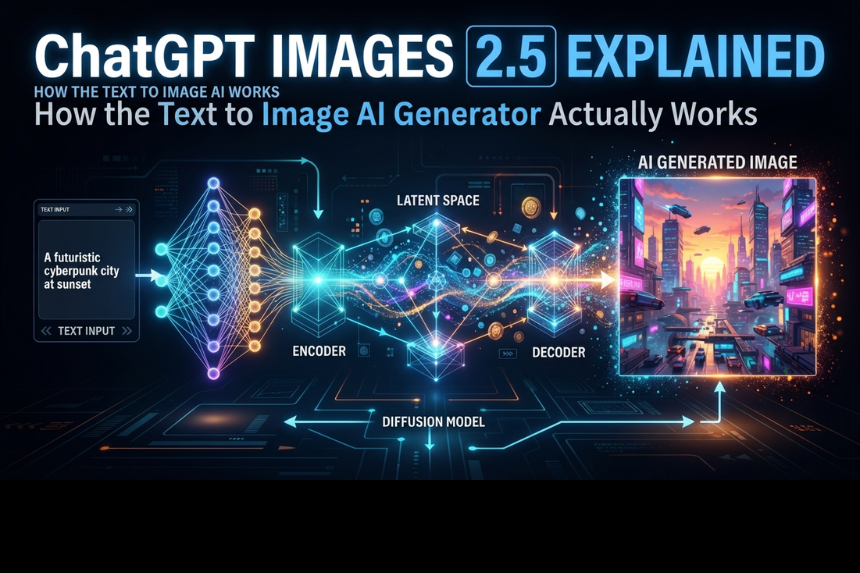
Break the process into four stages and the technology stops feeling mysterious.
First, the model parses your language. It identifies subjects, modifiers, spatial relationships and any hard constraints you specified. Second, it builds an internal plan: where objects sit, how light falls, which elements dominate. Third, it synthesizes the image while referencing that plan. Finally, it reviews the result and corrects obvious contradictions before delivery.
That review step explains why generation sometimes takes longer than you expect. The model is essentially checking its homework. Meanwhile, latency has still improved sharply, because the underlying architecture got leaner.
Flare and Sunburst: Two Engines, One Family
Developers received two API variants rather than a single endpoint. Flare prioritizes speed and handles high-volume work efficiently. Sunburst trades time for detail, which suits editorial layouts and precision editing. Hands-on testing suggests Flare powers the default consumer experience, although official documentation stays vague on that point.
Choose deliberately. A social media team publishing forty assets weekly benefits from Flare. A print studio preparing a magazine spread should accept Sunburst’s slower cycle.
The Sketch Feature Changes the Creative Workflow
The headline addition in ChatGPT Images 2.5 is sketch-to-image conversion. You draw a rough shape, mark it with the sketch command and the model treats your drawing as structural guidance. Composition control finally lives in your hands rather than in a paragraph of adjectives.
Anyone who has fought a text prompt for twenty minutes understands the value. Describing “the logo slightly left of center, above the headline, with generous whitespace” takes effort. Drawing three boxes takes six seconds. Additionally, generation latency dropped by roughly half compared with the previous version, so iteration cycles feel conversational instead of sluggish.
Templates, in-image commenting and shareable prompts arrived alongside the sketch tool. Those features sound minor until a team of five needs consistent brand output. Then they become the difference between chaos and a workflow.
Practical Prompting Techniques That Hold Up
Fifteen years in content and search taught me that tools reward specificity. These generators are no exception.
Describe the medium first. “Editorial photograph, 50mm lens, soft window light” anchors the model far better than “beautiful image.” Next, name the subject with concrete nouns. Then state your constraints explicitly: aspect ratio, text content, colour palette and anything that must not appear.
Avoid stacking twelve adjectives. Reasoning models weigh instructions, so contradictory modifiers force a compromise you did not want. Instead, generate once, read the output honestly and refine through conversation. Editing in dialogue is where the current generation genuinely outperforms diffusion competitors like Midjourney.
For example, a client recently needed six product shots with identical lighting. We generated one master image, then requested angle variations referencing that original. Consistency held across all six frames. Two years ago, that request would have produced six unrelated products.
Where the Technology Still Falls Short
Honest assessment builds trust, so let me name the weaknesses.
Certain subjects still carry a composited look. Portraits occasionally appear pasted onto backgrounds rather than photographed within them. Residual noise patterns persist in gradients and shadows, although they are milder than before. Hands and reflective surfaces remain imperfect.
Furthermore, the model inherits aesthetic habits from its training data. Left unguided, it defaults to glossy, slightly over-lit imagery that experienced art directors recognise instantly. Fighting that default requires deliberate stylistic direction in every prompt.
Rights management deserves attention too. Brand teams should document their generation prompts, verify commercial licensing terms and avoid mimicking living artists. Regulatory scrutiny of synthetic media keeps tightening across the EU and several US states.
Choosing the Right Tool for Your Workflow
Raw model access suits developers comfortable with API calls and quality parameters. Everyone else benefits from an interface layer that handles sizing, batching and post-production.
That distinction matters more than model benchmarks. A photographer producing thumbnails weekly needs cropping presets, background removal and export options. A startup founder building a pitch deck wants speed and templates. Pick the environment that removes friction from your specific task, because the underlying generator performs similarly across wrappers.
Test any platform with three prompts before committing. Try dense text, a multi-object composition and a stylistic request. Those three cases reveal quality gaps quickly.
The Shift Worth Noticing
Image generation stopped being a slot machine sometime this year. Models now interpret intent, plan structure and verify results, which moves them closer to collaborators than novelty engines. Prompt craft still matters enormously, though the skill has shifted from incantation to clear creative direction.
Treat the tool as a junior art director with unlimited patience. Brief it properly, review its work critically and iterate without ego. Handled that way, a modern text to image AI generator will compress days of visual production into an afternoon, while leaving the final judgement exactly where it belongs: with you.