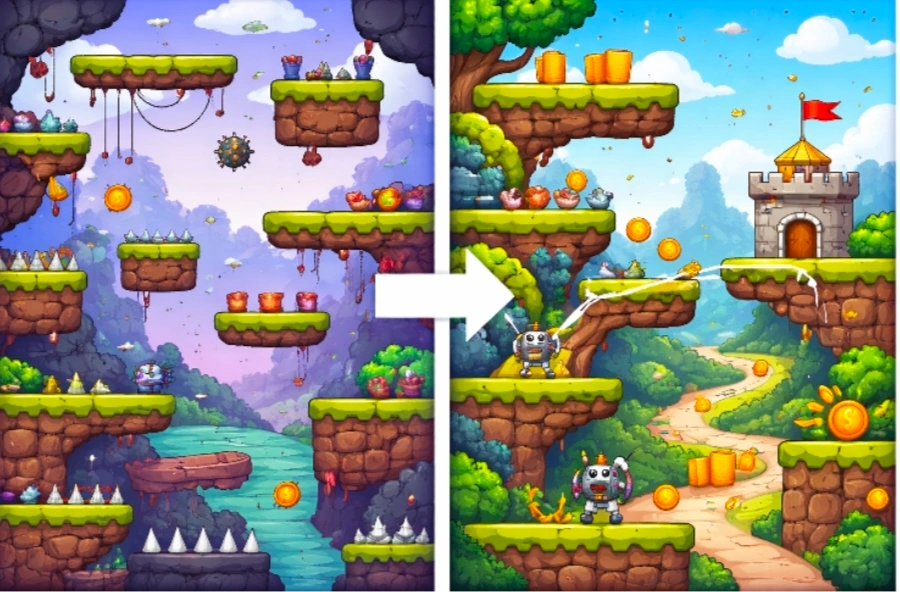
Many makers notice that their game levels look nice but feel messy or unfair when played. Platforms appear in strange places, paths lead nowhere, and difficulty jumps without warning. This often happens in games that generate content automatically because the system prioritizes variety over thoughtful design. Players quickly sense when levels feel random instead of crafted with care, and they lose interest or become frustrated. The good news is that you can guide the generation process to create levels that feel purposeful and well-made without losing the benefits of automatic creation. Small changes to rules, spacing, and structure turn random layouts into flowing, balanced experiences that players enjoy exploring. This guide explains why levels often feel unplanned and provides clear steps to fix the problem with your casual games. Follow these methods, and your levels will feel intentionally designed, fair, and fun to play.
Why Generated Levels Often Feel Random
Automatic level creation works by combining pieces using basic rules, but without strong guidance, it produces uneven results. The system might place too many obstacles in one area and leave large empty spaces in another. It can create paths that are too short or too long or position goals in ways that feel accidental rather than rewarding. Players expect levels to have a clear beginning, interesting middle sections, and a satisfying end. When the generation ignores this natural flow, the level feels like a collection of random parts instead of a designed space. Difficulty can also swing wildly because the system does not understand concepts like fair challenge or good pacing.
These issues become more noticeable as players spend more time in the game. Early levels might feel okay by chance, but later ones expose the lack of careful structure. Fixing this requires adding smart limits and patterns that keep the creative freedom while bringing order and purpose to each level.
Four Main Reasons Levels Feel Random
Understand these four common causes so you can target your fixes effectively.
- Weak Guiding Rules: The generation system has too much freedom and places objects without considering player movement or flow.
- Poor Spacing and Layout: Objects appear too close together or too far apart, creating cramped or empty areas that feel unplanned.
- Inconsistent Difficulty: Challenge levels change suddenly because there are no controls on how many obstacles or hazards appear in each section.
- Missing Clear Goals and Paths: Levels lack obvious starting points, natural progression, or rewarding endings, so players feel lost rather than guided.
Setting Clear Rules for Level Generation
Strong rules give the generation system direction while still allowing variety. Describe the overall shape and flow you want for each level. For example, tell the system to create a clear left-to-right path with occasional upward or downward branches for exploration. Set limits on how many obstacles can appear in any single section. Define safe zones near the start and near the goal where the player can recover or prepare. These boundaries prevent the level from becoming a chaotic mix of hazards with no breathing room. Include rules for pacing. Early parts of the level should introduce ideas gently, middle sections combine them in interesting ways, and the end should feel like a climax with a clear finish. When the system follows these patterns, every generated level feels like it was planned with purpose.
Improving Spacing and Layout
Good spacing makes levels feel designed rather than thrown together. Create consistent gaps between platforms so players can make jumps with confidence. Leave enough open space for movement while placing interesting features at natural intervals. Guide the generation to build small connected areas instead of scattering objects randomly across the screen. Think of each level as a series of small challenges that connect smoothly. For example, a simple jump section followed by a moving obstacle section, then a short puzzle area. Add natural landmarks such as wider platforms or distinct background changes that help players understand where they are and where they need to go. These visual and structural cues make the level feel crafted and easier to navigate.
Four Practical Steps to Make Levels Feel Designed
Use these four steps to transform random generation into purposeful level design.
- Define the overall structure first. Describe the start area, main path, optional branches, and ending goal so the system builds around a clear skeleton.
- Add safety and breathing spaces. Include safe landing spots and short rest areas between challenges so players never feel overwhelmed.
- Control object density and variety. Set rules for how many obstacles appear in each part of the level and mix easy and medium challenges in a balanced way.
- Create clear progression and rewards. Make sure each section builds on the previous one and ends with a visible goal or satisfying completion moment.
Balancing Difficulty Across Levels
Players enjoy levels that feel fair and increase in challenge at a steady pace. Set rules that keep early sections simple and gradually add more elements as the player moves forward. For example, start with basic jumps, then introduce moving platforms, and later combine both in clever ways. Avoid sudden spikes where one area becomes much harder than the rest. Use gentle increases in speed, spacing, or number of hazards so players feel they are improving rather than fighting unfair odds. Include multiple paths in some sections so skilled players can take riskier routes for better rewards while careful players can choose safer options. This choice makes levels feel thoughtfully designed and gives different types of players an enjoyable experience.
Adding Natural Flow and Connections
Flow is what makes a level feel like a journey rather than a random collection of parts. Connect different sections with smooth transitions, so players move naturally from one challenge to the next. Avoid placing large empty gaps or sudden walls that break momentum. Use visual lines or background elements that guide the eyes toward the next area. Make sure the goal remains visible or hinted at from a distance so players always know the general direction.
Test the full flow by playing through complete levels multiple times. Adjust any spots where movement slows down or where the player feels unsure about what to do next. Smooth flow turns separate pieces into a cohesive experience that feels intentionally built.
Testing Levels for Design Quality
After making changes, play each generated level as a regular player would. Ask yourself whether it feels like a designed space or still feels scattered. Check if the difficulty rises smoothly and if the path feels logical. Create ten or more different levels and compare them. Look for patterns that work well and ones that still feel random. Adjust the rules based on what you observe until most levels share the same sense of quality and care. Ask friends to try several levels and tell you which ones feel the most fun and why. Their feedback often reveals small issues with flow or fairness that you might miss after working on the game for a long time.
Drawing Inspiration from a Real Game
A strong example of well-structured levels that feel carefully designed is Slice Rush. You can play it on Astrocade. How each level guides the player smoothly through challenges with clear paths and balanced difficulty. Use the same attention to flow and purposeful placement when shaping your own generated levels.
Keeping Improvements Simple and Consistent
Focus on steady, small adjustments rather than trying to fix everything at once. Start with basic structure and spacing, then add difficulty controls and flow improvements. This step-by-step approach prevents new problems from appearing while you work.
Revisit your rules regularly as the game grows. New object types or features can affect how levels feel, so quick tests after each addition keep the quality high. Simple, consistent rules usually produce the most reliable and enjoyable results.
Wrapping Up the Solutions
Levels feel random when generation lacks strict guiding rules, good spacing, balanced difficulty, and clear flow. By setting clear structure, improving layout and spacing, controlling difficulty progression, and creating natural connections, you can make every generated level feel thoughtfully designed and fun to play. Whether you build your AI-generated games with no-code Astrocade or other easy tools, these practical steps help you turn chaotic content into polished experiences that players appreciate. Begin today by defining the basic skeleton for your levels and testing a few new versions. Adjust the rules based on real play and continue refining until your levels feel intentional and satisfying. Players will enjoy exploring your game much more when each level feels like it was built with care. A well-designed feeling keeps them engaged longer and makes your game stand out. Take the time to guide your generation process and watch your levels transform from random collections into memorable, enjoyable spaces.